

Where To Find It
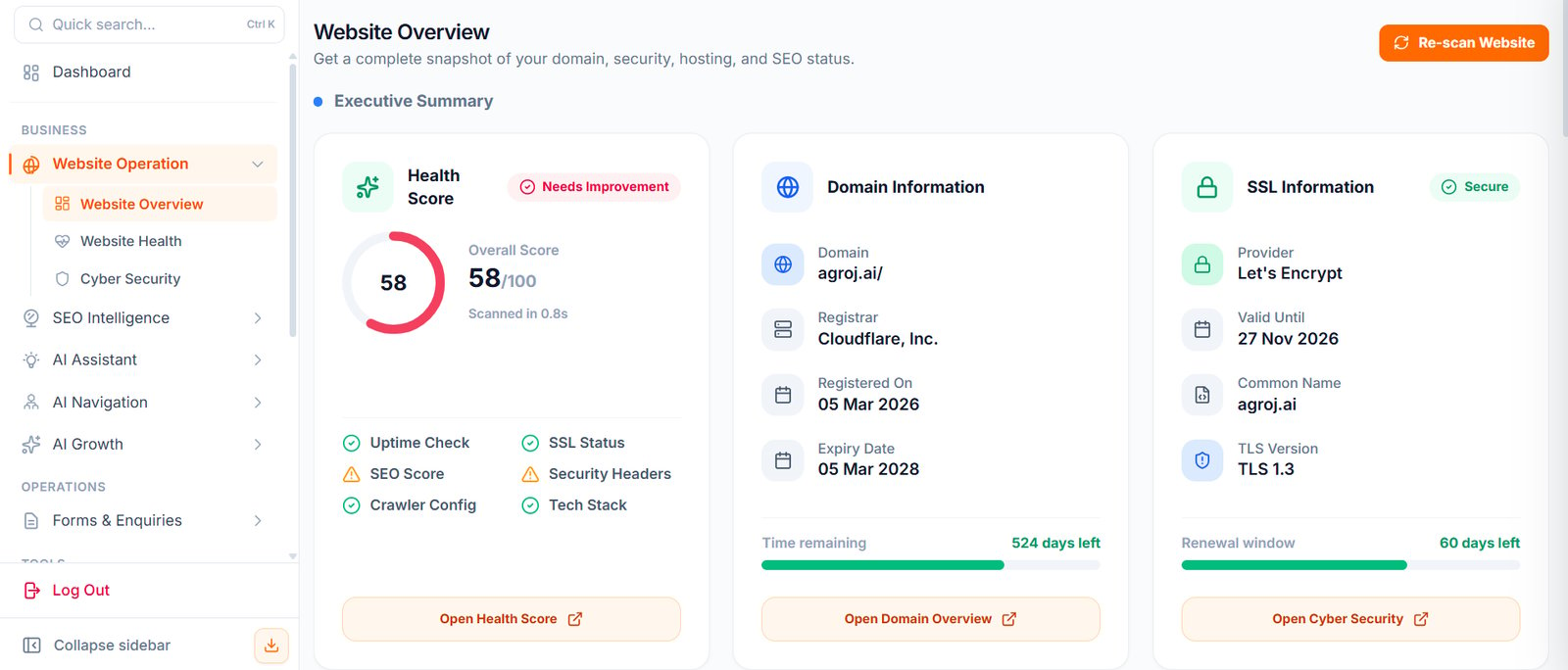
Open: https://portal.wowagent.ai/website Or go to: Website Operation > Website OverviewWhat You Can See Here
The Website Overview page helps you understand:- Website details
- Domain status
- SSL status
- Hosting information
- SEO condition
- Security condition
- Technology and performance signals
- Website audit results
Main Cards
You may see cards such as:- Health Score
- Domain Information
- SSL Information
- Uptime Check
- SEO Score
- Security Headers
- Crawler Configuration
- Technology Stack
Re-scan Website
Use Re-scan Website when you want WOWagent to refresh the website audit. This is useful after:- Updating your website
- Changing hosting
- Updating DNS
- Renewing SSL
- Installing new plugins
- Fixing SEO or security issues
- Changing your website theme or code
- Moving your website to another server
What WOWagent Can Scan
WOWagent can check:- DNS records
- SSL certificate
- Hosting information
- Domain registration details
- Security headers
- SEO health
- Robots.txt and sitemap
- Technology stack
- Website performance
When To Use Website Overview
Use this page when you want to answer questions like:- Is my website healthy?
- Is SSL working?
- Is my domain active?
- Are there SEO issues?
- Are there security issues?
- Has my recent website change improved anything?
- Do I need to take action?
- Is my website ready for visitors?
- Should I ask my developer or hosting provider to fix something?