

Where To Find It
Open: https://portal.wowagent.ai/seo-research/domain Or go to: SEO IntelligenceWhat You Can Do
SEO Intelligence helps you:- Review domain SEO health
- Find keyword opportunities
- Study competitors
- Check backlinks
- Review brand mentions
- Analyze AI visibility
- Find technical SEO issues
- Plan new content topics
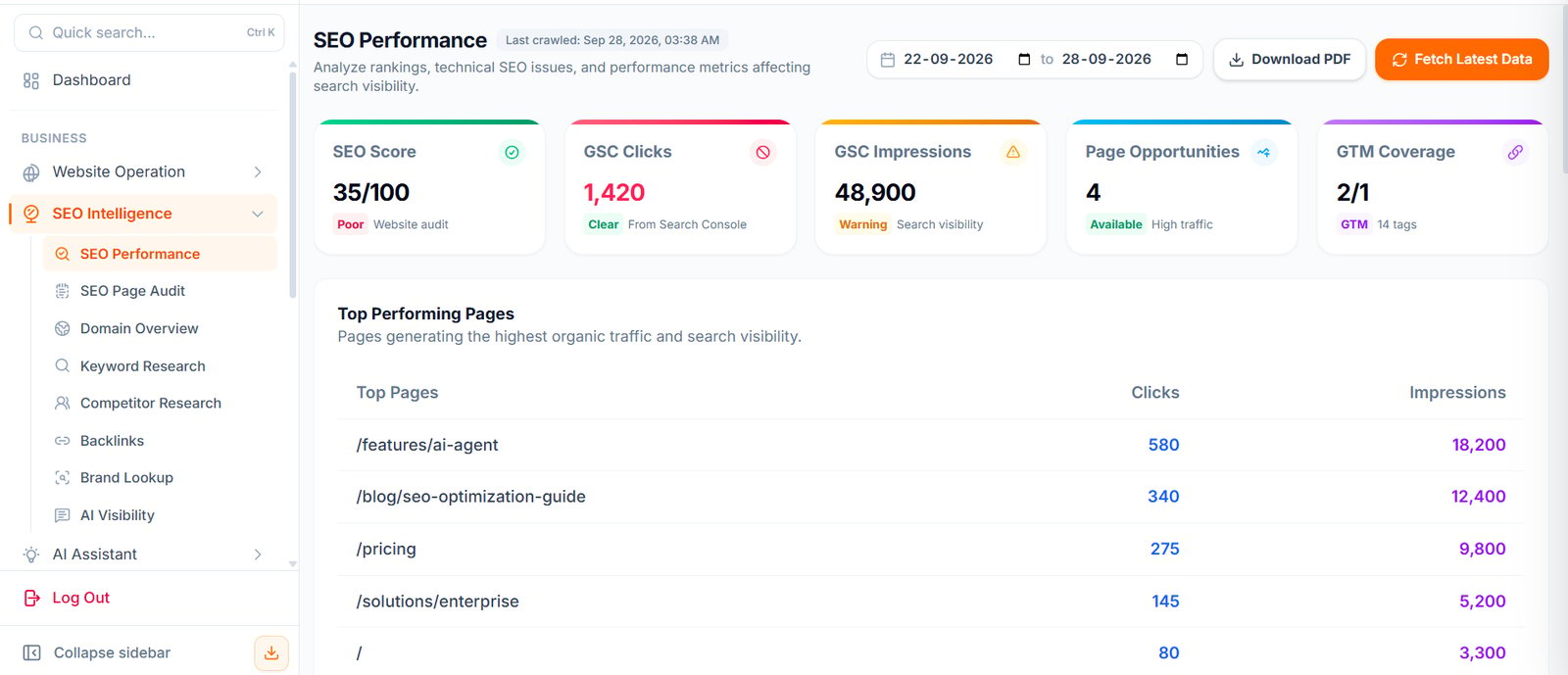
SEO Performance
SEO Performance shows the SEO condition of your selected website. Use it to understand:- SEO score
- Search Console clicks
- Search Console impressions
- Page opportunities
- Tag Manager coverage
- Top performing pages
- Date-based SEO performance
SEO Page Audit
SEO Page Audit helps you review page-level and technical SEO issues. Use it to check:- Page titles
- Meta descriptions
- Headings
- Canonical tags
- Indexing issues
- Broken links
- Sitemap and robots.txt
- Core web vitals or performance signals
Managed indexing files
SEO Page Audit distinguishes existing indexing files from WOWagent-managed files. Use Review & Approve to inspect proposed setup before creating missing managed files. Existing website sitemaps and robots.txt are preserved; published WOWagent pages can be added through a separate managed sitemap. When the managed sitemap is available, use Submit Sitemap to Google through the selected Search Console connection. The connected Google account needs property Owner permission; Full User access is insufficient for submission. Use Re-Crawl Website to refresh saved findings after changes. Open page details for individual issues, and use Export CSV for the available page data. A report or recommendation does not mean your website’s source code was automatically changed.Domain Overview
Domain Overview gives a high-level SEO summary for your website. Use it to understand your current position and main action items.Keyword Research
Keyword Research helps you discover search terms your customers may use. Use it to find:- Keyword ideas
- Search intent
- Content gaps
- Topic opportunities
- Possible blog topics
Competitor Research
Competitor Research helps you compare your website with other businesses in your market. Use it to understand:- Who your SEO competitors are
- What topics competitors cover
- Where competitors may be stronger
- What content you should create
Competitor monitoring
Save competitor domains and target keywords rather than relying only on discovered candidates. Competitor settings also support monitoring intervals, rank-change thresholds, and email or in-app alert preferences. Review the latest check and any error before interpreting a ranking change. Competitor strategy is shared with AI Visibility. Members need the appropriate Competitor Research edit permission to change shared competitor settings.Backlinks
Backlinks show websites that link to your domain. Use this to review:- Referring domains
- Link quality
- Anchor text
- Authority signals
- Link building opportunities
Brand Lookup
Brand Lookup helps you review brand visibility across the web. Use it to find:- Brand mentions
- Reputation signals
- Citation opportunities
- Unlinked mentions
AI Visibility
AI Visibility helps you understand how your brand may appear in AI-style search and answer engines. Use it to review:- AI prompt visibility
- Brand citation opportunities
- Questions users may ask AI tools
- Content gaps for AI discovery
Recommended SEO Workflow
1
Start with Domain Overview
Review your high-level SEO summary and main action items.
2
Review SEO Performance
Check your SEO score, Search Console data, and top performing pages.
3
Run SEO Page Audit
Identify page-level and technical SEO issues.
4
Fix technical issues first
Resolve the highest-impact technical problems before moving on.
5
Use Keyword Research to find topics
Discover keyword ideas, search intent, and content gaps.
6
Study competitors
Compare your website with competitors and identify content opportunities.
7
Review backlinks and brand mentions
Check referring domains, link quality, and brand visibility.
8
Use AI Visibility to improve AI discovery
Prepare your content for modern search behavior in AI-style engines.
9
Create content from high-value opportunities
Build new content based on the best opportunities you found.
Best Practices
Review SEO Intelligence regularly. Focus first on high-impact technical issues. Create content for real customer questions. Compare competitors but do not copy them. Use AI Visibility to prepare your content for modern search behavior.Next Steps
AI Content
Turn keyword ideas into blog articles.
Health and Security
Fix technical issues on your website.