

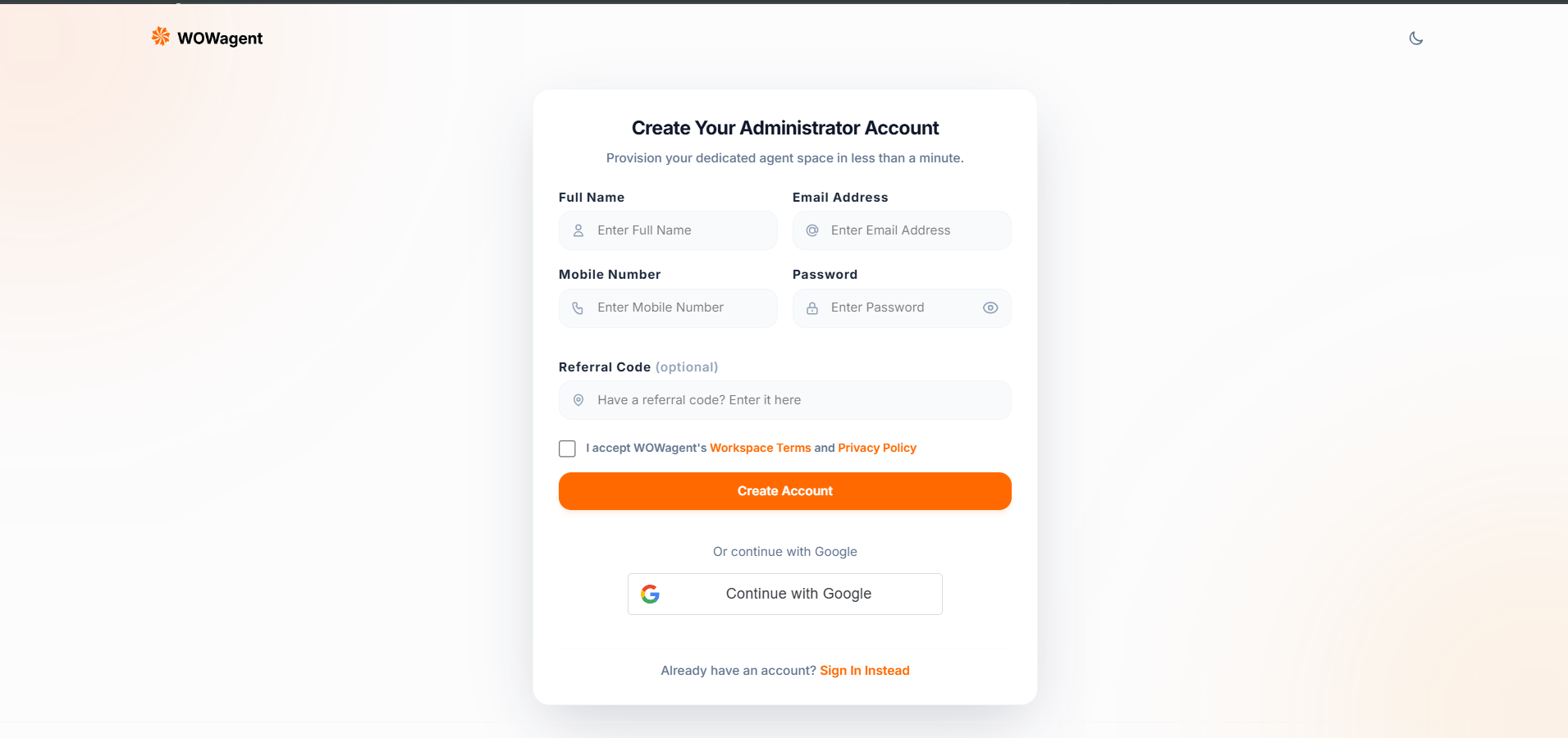
Where To Find It
Open: https://portal.wowagent.ai/sign-up After signup you see Verify Your Email popup, then go to Login.How To Signup
Fill all fields then accept Terms:- Full Name: letters plus spaces only. No numbers. No leading space. Example: Rahul Sharma
- Email Address: valid email, no spaces. Example: you@example.com. Lowercase auto saved.
- Mobile Number: digits only, max 10, must start with 6 to 9. India format. Example: 9876543210
- Password: min 8 chars. Must have Upper plus Lower plus Number plus Special char. Live checklist shows green when ok. No leading space.
- Referral Code optional: via ref link like sign-up with ref CODE or manual input. System validates. If invalid you see Referral Code Not Applied modal. You can Continue Without Referral or Fix Code.
- Check Workspace Terms plus Privacy Policy checkbox. Required. Version 2026-08-13.
- Click Create Account.
- See Verify Your Email popup with check Inbox plus Spam text. Click Go to Login.
- Verify email within 24 hours, then login.
Password Rules In Detail
- Length 8 to 128 chars
- One Upper A to Z
- One Lower a to z
- One Digit 0 to 9
- One Special like @ hash dollar star etc
- No leading space
- Checklist auto hides after 4 seconds when all green
Referral Code In Detail
- If you opened ref link, banner shows code applied.
- Manual entry validates after 500 ms debounce.
- Invalid code does not block signup. You can continue without it.
- Valid code links signup to referrer for rewards.
What Happens Next
- Account created as unverified.
- Verify mail sent with link containing verify token valid 24 hours.
- Click link. Backend verifies and creates default trial if needed.
- You return to Login with verified true.
- Login. On first login, trial ensured and workspace created.
- Go to Onboard to add website.
Troubleshooting
- Name error: remove numbers and symbols, remove leading space.
- Email error: remove spaces, check @ and dot format.
- Mobile error: must be 10 digits, start 6 to 9. No plus 91, no spaces.
- Password stays red: meet all 5 rules. Copy paste may add space, type manually.
- Must accept Terms: tick checkbox, scroll terms if needed, retry.
- No email: check Spam plus Junk plus Promotions, click Resend, wait 2 mins, check email spelling in signup.
- Link expired: resend verification mail from Login popup.
- Google signupConflict like EMAIL VERIFICATION REQUIRED: verify email first, then Google login.
- Still stuck: Support Ticket with name plus email plus screenshot.